Well, it all started when I wanted to run my Reachy Mini without sending my voice or my image, or my home’s, or my family’s, to the cloud. Even though Google, Anthropic and so many others already have so much data, they don’t need to have everything, right? And, since I don’t have hardware that can run everything locally and still handle all my little developer things, I decided to outsource only the Mini’s “brain” (for now). Here I tell you how I adapted the official Reachy Mini conversation app, running without a single line changed, with my own voice server of about 1 GB on the Mac. Audio and images never leave the machine. Only text goes to the language model.
About the Mini#
Maybe you don’t know the Reachy Mini yet, so let me introduce it, this cute little robot down below: the Reachy Mini, the open source robot from Pollen Robotics with Hugging Face. I’ve had it for a while, but the PhD didn’t leave me time for fun stuff. :) This week, finally, I decided to take it beyond the most basic use and start bringing it into my routine: asking about general things, searching the internet, helping with recipes, practicing German and even discussing tasks.
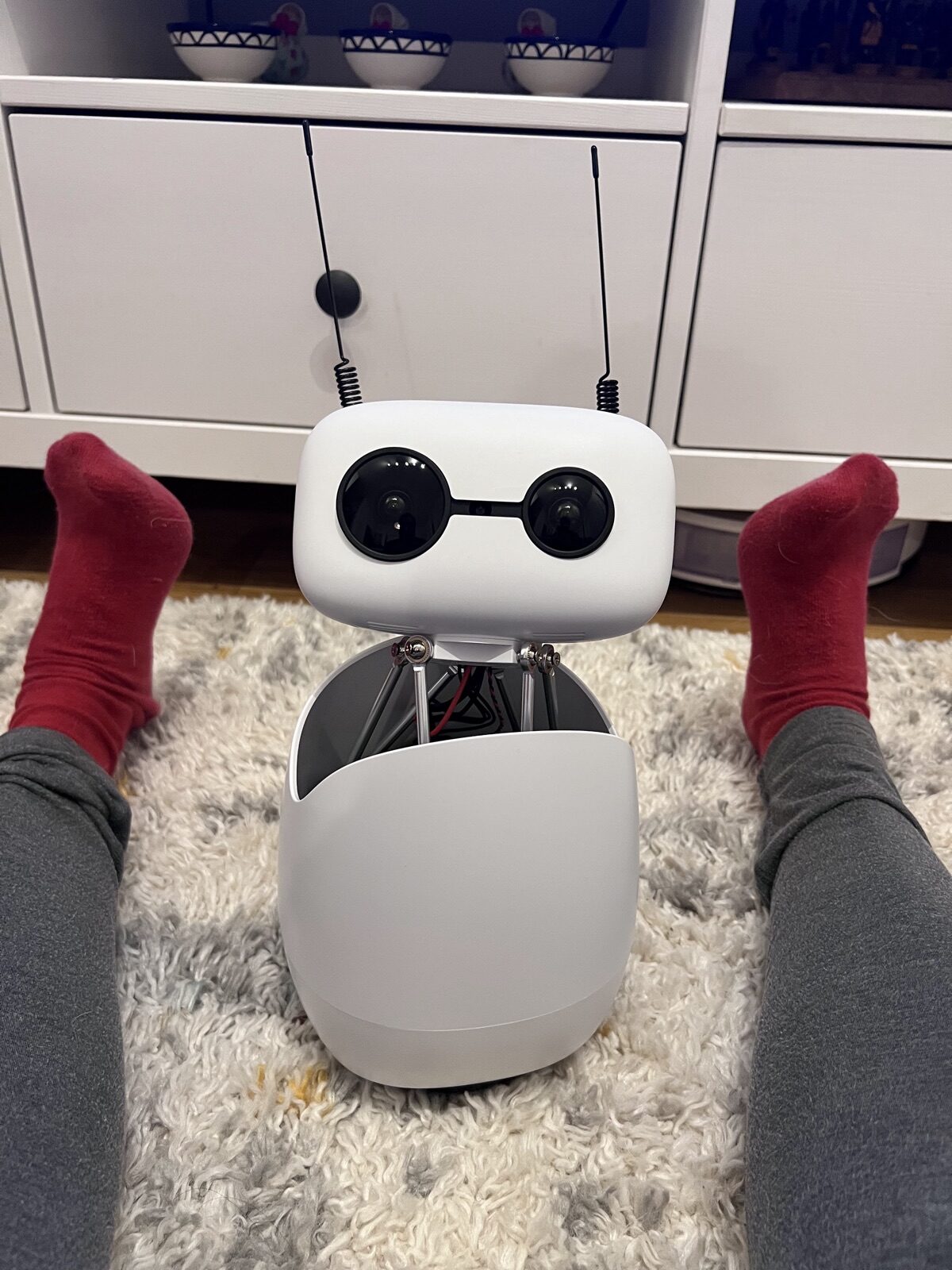
The wireless version of the Mini runs on a Raspberry Pi CM4 and has sensors, microphones and a camera, and you can create your own apps and run them on it, interacting with the sensors and everything else. On top of that, you can build your own set of tools or use the default tools to search the internet or check the robot’s own documentation. There are apps for telling stories, watching the baby, being a language tutor, cooking and more.
Among the apps, the most famous of all is the conversation one. This app, also created by Pollen Robotics, is the base for many of the ones I mentioned because it organizes the whole conversation: the sound from the microphones, the camera, the movements and the external tools (small actions like moving the head or controlling the volume). The coolest part is that the voice part lives in a separate server, which can run on a machine of yours or on the service of your choice.
The app itself has no voice model. It captures the robot’s sound and sends everything to a voice server, which listens, decides what to answer and sends audio back. The conversation between the two follows the OpenAI Realtime API format, which became the de facto standard for real-time voice (I explain it better further down). In other words, the app doesn’t depend on OpenAI, nor exactly on Hugging Face: it depends on having someone on the other side of the websocket speaking this format.
This server is usually speech-to-speech (s2s), an open source pipeline from Hugging Face that implements this format and puts the voice pieces together in a single server. What changes is where it runs, and the HF_REALTIME_CONNECTION_MODE variable picks which of the two places:
deployed, the default: s2s running on Hugging Face’s infrastructure. The app asks for a session with your Hugging Face login and sends the audio there, where the voice is transcribed and synthesized.local: a server you run yourself, at whatever address is inHF_REALTIME_WS_URL. The app itself suggests running s2s, but any server that speaks the format works.
The Reachy Minis started on OpenAI’s GPT-realtime and moved to s2s (Hugging Face tells how it built this server in Hugging Voice).
The local mode was my way in.
Although being able to run everything locally is wonderful, it isn’t always feasible, and right now there’s no middle ground light enough for the conversation app. Many people have been forking it and adapting it to their needs, me included (more on that below). The big downside is losing upstream updates at such an experimental stage, with so many things changing so fast. That made me think about how to build this hybrid infrastructure, where audio and images stay local and only text can leave the machine, reusing the code structure that already exists and the patterns the project was built on.
But why don’t I run everything locally? You might be asking. Right now (and this may change in weeks), running a language model on a MacBook M4 with only 16GB, with quality close to models like DeepSeek and Claude, is way too hard - unlikely, I’d say (after all, Firefox, Spotify, PyCharm and so many other memory eaters are in the competition). To give you an idea, with PyCharm and Firefox open, about 3 GB of the 16 GB were left.
But why don’t I send everything to Claude? You might also be asking. I believe privacy should be a human right, one where our data is ours. As long as this right is subjugated to profit, unfortunately, we’ll have to be very conscious about where we send our data and how it is processed. Can text be very personal? Yes. Would I rather run everything locally? Also yes. But I’m only human. I do what I can. For now, not sending photos and my voice is where I draw the line.
To sum up what I wanted:
- Privacy for audio and images
- Use it on the 16GB Mac
- Be understood and understand a natural voice in Brazilian Portuguese
- Keep receiving updates from the conversation app
What I tried before#
Before getting to my own server, I thought of four paths. I tested the first three on a 16 GB MacBook M4 and ruled out the fourth.
- Fork with Hermes. I connected the Mini to Hermes Agent, from Nous Research, through a bridge of my own. It worked as an experiment, but it tied me to a custom fork, which I don’t consider ideal.
- Fork with a local mode inside the app. I wrote a local backend in the app itself: 1,062 more lines across 10 files. The voice took about 650 MB and worked well. To decide when to look through the camera, there was a keyword heuristic, which I later replaced with a tool. But every Pollen update would require reapplying everything.
- Hugging Face’s s2s running on the Mac.
speech-to-speechis the official local server: it speaks the same protocol the app expects and can send only the language model out (--llm_backend chat-completions). I ran it with Parakeet and Claude, with the app untouched. It worked, but it took 4.8 GB (peaking at 5.3 GB) with Qwen3-TTS and 6.6 GB with Kokoro, and froze the Mac. Two more problems showed up along the way. Kokoro didn’t work, because the app asks for a Qwen voice and the handler tried to load a file for that voice. And, with the default chunk size, TTS took 14 to 56 s per sentence. Not viable. And that was with the language model running elsewhere: even without it, s2s didn’t fit on my 16 GB Mac. - The hosted server (
deployedmode), or s2s on another machine. Ruled out: the first sends the audio out, and I don’t want to use another machine right now.
If the app already talks to a local server through a known protocol, and if s2s is heavy because it carries much more than the app uses, why not write only the piece the app uses?
What the server needs to do#
What is expected to be sent and received in the OpenAI Realtime format?
The conversation is a continuous exchange of small messages over the websocket. The app sends the microphone sound in chunks (16 kHz PCM in base64). The server says when the person started and stopped talking and sends back the transcription. The app asks for a response, and the server sends the audio bit by bit, so the robot starts talking before the response is done. When the model wants to move the robot, the server sends a tool request; the app runs it and sends back the result as a conversation item. If you interrupt the robot, the app cancels the response in progress.
The OpenAI SDK defines about 45 event types. s2s doesn’t implement all of them: according to Hugging Voice, it’s 18, the minimum for a voice agent. My server also implements 18, 5 that the app sends and 13 that the server sends back, almost the same list.
So the idea was to implement the protocol with only what the conversation app needs, with light models AND with Brazilian Portuguese support. I’ll leave the challenges between the models and PT-BR for another post. In this server, four tasks had to be covered: voice detection, transcription, understanding and writing the response, and speech synthesis. Along the way one more came in, a filter so the robot only answers when it’s called.
Choosing to implement a smaller set has costs, and it’s worth saying which:
- Cascade instead of a native model. OpenAI’s realtime models listen and speak in a single model. Here there are four pieces in sequence: voice detection, transcription, language model and synthesis. Each handoff adds latency. In exchange, I choose each piece, and only the language model needs to leave the machine.
- The contract can change. The protocol belongs to OpenAI, not to Pollen or Hugging Face. An example of something that has already changed: in the beta version, the server confirmed a conversation item with
conversation.item.created; in the final version, OpenAI emitsconversation.item.addedand thenconversation.item.done. s2s and my server still use the old name, and nothing breaks because the app listens to neither. But this is the kind of change that can break the server without warning. - State lives in the server. The conversation history stays in the connection. If the server restarts, the app reconnects on its own, but the conversation starts over from scratch.
Talking the hybrid way#
The path of a sentence, from the microphone back to the speaker.
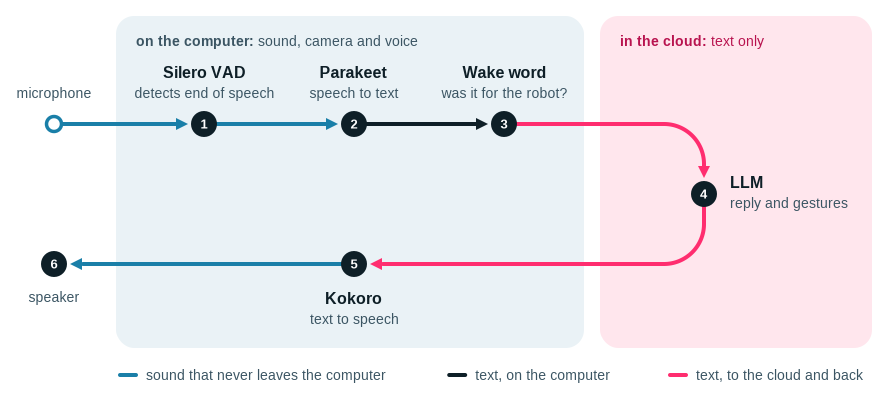
- “Is she still talking?” Silero VAD, 1.3 MB
A voice activity detector (VAD) looks at the sound in 32 ms chunks and says whether there’s speech. After half a second of silence, the turn ends. The official app already uses Silero, so the server reuses its code.
- Turning speech into text Parakeet Ultra (Moondream), a post-trained version of NVIDIA’s Parakeet TDT 0.6B v3, 600 million parameters, 740 MB on disk
Speech recognition (ASR) in 25 European languages, Portuguese included, running on the Mac’s GPU through transcribe.cpp. I use the same model in the Handy dictation app, for English and Portuguese, and I really like it. It transcribes sentences with low latency.
- “Is she talking to me?”
The text only moves on if it contains the name chosen for the robot (wakeword), in any of the spellings Parakeet produces. Parakeet is great because it’s accurate and fast, but you can’t force the language. So short words like “Mini” can be recognized as Minnie or some word from a Slavic language because of phonetic similarity (I’ll write more about this later because it was really interesting to figure out). Once a conversation is activated, it stays open for 5 minutes without needing to repeat the name (silences are treated as pauses in the conversation on purpose).
- Writing the response Tested with Claude (Anthropic), GPT-6 Luna (OpenAI via Nous Portal) and DeepSeek
The language model receives the profile instructions, the conversation history as text and the list of the robot’s tools. It returns the response text and, if it wants, movement requests. It’s the only step outside the computer, and it only carries text.
- Turning text into voice Kokoro, 82 million parameters, about 200 MB
Light speech synthesis (TTS) with Brazilian Portuguese voices. Each sentence is spoken as soon as it arrives, without waiting for the rest of the response, so the robot starts talking sooner. Unfortunately, for PT-BR, in this model, we only have 3 options: a guy, a woman and a pseudo Santa Claus (just in time for Christmas, really). There are very few training samples compared to other languages.
- Talking and moving
From here on everything happens in the app itself, with no changes, thanks to implementing an already known protocol. The app plays the audio on the robot and runs the requested tools. The result of each tool goes back through the server to the model, which can continue the response.
What about the camera? The app sometimes attaches a photo from the camera to the conversation (input_image). The server drops these photos and logs that it dropped them. For the Mini to see, I created an external tool, look, that takes the photo and asks a local vision model (qwen2.5vl:3b, on Ollama). Only the text description reaches the language model. The vision model takes 1.3 to 3.2 GB while loaded, and Ollama unloads it after 5 minutes without use. The answer takes about 0.7 s with the model loaded and 8 s cold.
And the latency? I first measured it with a test client, before turning on the robot: from the end of speech to the first sound of the response, about 2.9 s. Of that, 1.2 s go by until the server closes the turn. With the question already in text, the first sound came out between 1.4 and 1.9 s. In a conversation with the robot, the server logs show 0.9 to 1.25 s between the transcription being ready and Claude’s response starting to arrive. When a tool comes in, its time adds up: web searches took 2.7 to 3.9 s, and the first look through the camera, with the vision model still cold, 10 s in total, counting the photo. You can have a conversation, but not with the fluency of a native realtime model.
“Bedtime, Mini!”#
With all this, the pipeline runs hybrid, with the voice server taking up to 1 GB of memory (the vision model, when loaded, adds another 1.3 to 3.2 GB) and with fairly satisfying PT-BR support. It’s wonderful to see how far we’ve come with activity recognition, transcription and other models, and at the same time it’s challenging to think that languages as popular as Portuguese, Spanish, French, etc. are left behind just because they’re not English. Hugging Voice sums it up well: a cascade is only as multilingual as the intersection of its models. In their system, Portuguese is among the 7 officially supported languages, and even so they admit that Parakeet’s language detection can fail. More on that in the next post!
Other people have also made changes along these lines. reachy-rose also swaps only the server of the official app, with the full s2s and bigger models, in 8 to 9 GB on a 24 GB Mac mini, and also only answers when called by name. The post Reachy Mini goes fully local, from Hugging Face itself, follows the s2s route. Speaches imitates the realtime protocol, but doesn’t implement response cancellation, which the app uses when it’s interrupted.